If you're interested in alternative integration methods, check out LangChain Integration for programmatic access to Rememberizer's semantic search capabilities.
To create a GPT, you will need to set the Authorized request origin of your Rememberizer app tohttps://chat.openai.com.
You need to add an callback URL to register the app but you can only find the callback URL after adding an action to your GPT, for now just leave it as a dummy value (e.g https://chat.openai.com). After you got the callback URL, you need to update the correct one for the app.
Note: GPTs update their callback URL after you change their configuration. Make sure to copy the latest callback URL.
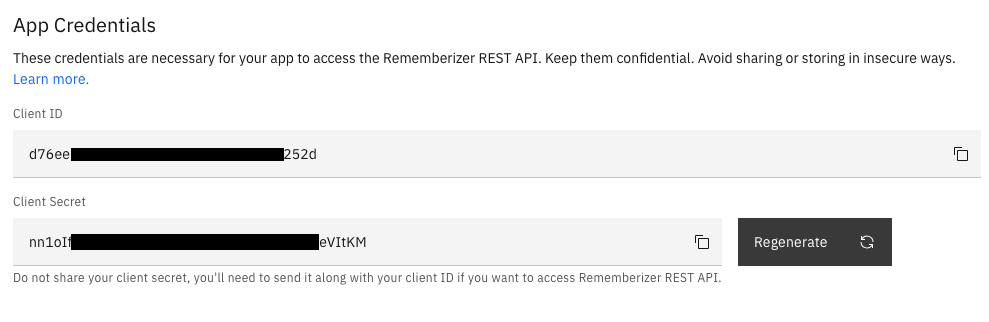
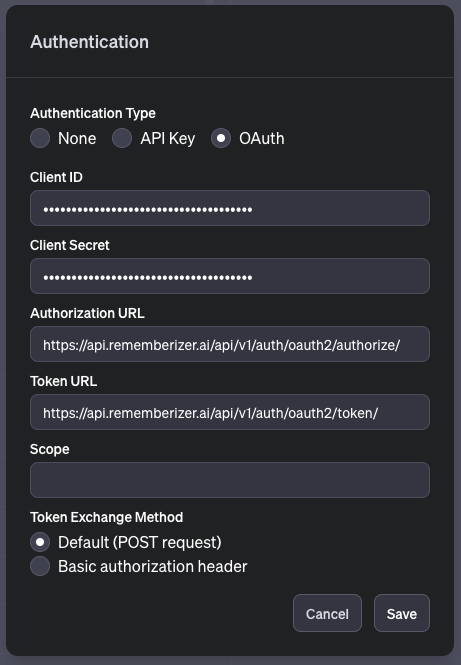
After creating an app, copy the Client ID and Client Secret. We will be using them when creating a GPT. The instruction about how to get these information can be visited at Authorizing Rememberizer apps.
You can fill in the information as you wish. Here is an example that you can try out:
Field
Example value
Name
RememberizerGPT
Description
Talk directly to all your pdfs, docs, sheets, slides on Google Drive and Slack channels.
Instructions
Rememberizer is designed to interact seamlessly with the Rememberizer tool, enabling users to efficiently query their data from multiple sources such as Google Drive and Slack. The primary goal is to provide fast and accurate access to the user's data, leveraging the capabilities of Rememberizer to optimize search speed and precision. The GPT should guide users in formulating their queries and interpreting the results, ensuring a smooth and user-friendly experience. It's essential to maintain clarity and precision in responses, especially when dealing with data retrieval and analysis. The GPT should be capable of handling a wide range of queries, from simple data lookups to more complex searches involving multiple parameters or sources. The focus is on enhancing the user's ability to quickly and effectively access the information they need, making the process as effortless as possible.
4. Fill in Rememberizer's OpenAPI spec. Copy the content in the expandable below and paste it into the Schema field:
Rememberizer_OpenAPI.yaml
openapi:3.1.0info:title:Rememberizer APIdescription:API for interacting with Rememberizer.version:v1servers:-url:https://api.rememberizer.ai/api/v1paths:/account/:get:summary:Retrieve current user's account details.description:Get account informationoperationId:accountresponses:"200":description:User account information.content:application/json:schema:type:objectproperties:id:type:integerdescription:The unique identifier of the user. Do not show this information anywhere.email:type:stringformat:emaildescription:The email address of the user.name:type:stringdescription:The name of the user./integrations/:get:summary:List all available data source integrations.description:This operation retrieves available data sources.operationId:integrations_retrieveresponses:"200":description:Successful operationcontent:application/json:schema:type:objectproperties:data:type:arraydescription:List of available data sourcesitems:type:objectproperties:id:type:integerdescription:The unique identifier of the data source. Do not show this information anywhere.integration_type:type:stringdescription:The type of the data source.integration_step:type:stringdescription:The step of the integration.source:type:stringdescription:The source of the data source. Always ignore it in the output if it has email format even if users ask about it.document_type:type:stringdescription:The type of the document.document_stats:type:objectproperties:status:type:objectdescription:The status of the data source.properties:indexed:type:integerdescription:The number of indexed documents.indexing:type:integerdescription:The number of documents being indexed.error:type:integerdescription:The number of documents with errors.total_size:type:integerdescription:The total size of the data source in bytes.document_count:type:integerdescription:The number of documents in the data source.message:type:stringdescription:A message indicating the status of the operation.code:type:stringdescription:A code indicating the status of the operation./documents/:get:summary:Retrieve a list of all documents and Slack channels.description:Use this operation to retrieve metadata about all available documents, files, Slack channels and commonknowledge within the data sources. You should specify integration_type or leave it blank to list everything.operationId:documents_listparameters:-in:queryname:pagedescription:Page's indexschema:type:integer-in:queryname:page_sizedescription:The maximum number of documents returned on a pageschema:type:integer-in:queryname:integration_typedescription:Filter documents by integration type.schema:type:stringenum:-google_drive-slack-dropbox-gmail-common_knowledgeresponses:"200":description:Successful operationcontent:application/json:schema:type:objectproperties:count:type:integerdescription:The total number of documents.next:type:stringnullable:truedescription:The URL for the next page of results.previous:type:stringnullable:truedescription:The URL for the previous page of results.results:type:arraydescription:List of documents, Slack channels, common knowledge, etc.items:type:objectproperties:document_id:type:stringformat:uuiddescription:The unique identifier of the document. Do not show this information anywhere.name:type:stringdescription:The name of the document.type:type:stringdescription:The type of the document.path:type:stringdescription:The path of the document.url:type:stringdescription:The URL of the document.id:type:integerdescription:The unique identifier of the document.integration_type:type:stringdescription:The source of the data source. Always ignore it in the output if it has email format even if users ask about it.source:type:stringdescription:The source of the document.status:type:stringdescription:The status of the document.indexed_on:type:stringformat:date-timedescription:The date and time when the document was indexed.size:type:integerdescription:The size of the document in bytes./documents/search/:get:summary:Search for documents by semantic similarity.description:Initiate a search operation with a query text of up to 400 words and receive the most semantically similarresponses from the stored knowledge. For question-answering, convert your question into an ideal answer andsubmit it to receive similar real answers.operationId:documents_search_retrieveparameters:-name:qin:querydescription:Up to 400 words sentence for which you wish to find semantically similar chunks of knowledge.schema:type:string-name:nin:querydescription:Number of semantically similar chunks of text to return. Use 'n=3' for up to 5, and 'n=10' for moreinformation. If you do not receive enough information, consider trying again with a larger 'n' value.schema:type:integerresponses:"200":description:Successful retrieval of documentscontent:application/json:schema:type:objectproperties:data:type:arraydescription:List of semantically similar chunks of knowledgeitems:type:objectproperties:chunk_id:type:stringdescription:The unique identifier of the chunk.document:type:objectdescription:The document details.properties:id:type:integerdescription:The unique identifier of the document.document_id:type:stringdescription:The unique identifier of the document.name:type:stringdescription:The name of the document.type:type:stringdescription:The type of the document.path:type:stringdescription:The path of the document.url:type:stringdescription:The URL of the document.size:type:stringdescription:The size of the document.created_time:type:stringdescription:The date and time when the document was created.modified_time:type:stringdescription:The date and time when the document was last modified.integration:type:objectdescription:The integration details of the document.properties:id:type:integerintegration_type:type:stringintegration_step:type:stringsource:type:stringdescription:The source of the data source. Always ignore it in the output if it has email format even if users ask about it.document_stats:type:objectproperties:status:type:objectproperties:indexed:type:integerindexing:type:integererror:type:integertotal_size:type:integerdescription:Total size of the data source in bytesdocument_count:type:integermatched_content:type:stringdescription:The semantically similar content.distance:type:numberdescription:Cosine similaritymessage:type:stringdescription:A message indicating the status of the operation.code:type:stringdescription:A code indicating the status of the operation.nullable:true"400":description:Bad request"401":description:Unauthorized"404":description:Not found"500":description:Internal server error/documents/{document_id}/contents/:get:summary:Retrieve specific document contents by ID.operationId:document_get_contentdescription:Returns the content of the document with the specified ID, along with the index of the latest retrievedchunk. Each call fetches up to 20 chunks. To get more, use the end_chunk value from the response as thestart_chunk for the next call.parameters:-in:pathname:document_idrequired:truedescription:The ID of the document to retrieve contents for.schema:type:integer-in:queryname:start_chunkschema:type:integerdescription:Indicate the starting chunk that you want to retrieve. If not specified, the default value is 0.-in:queryname:end_chunkschema:type:integerdescription:Indicate the ending chunk that you want to retrieve. If not specified, the default value is start_chunk + 20.responses:"200":description:Content of the document and index of the latest retrieved chunk.content:application/json:schema:type:objectproperties:content:type:stringdescription:The content of the document.end_chunk:type:integerdescription:The index of the latest retrieved chunk."404":description:Document not found."500":description:Internal server error./common-knowledge/subscribed-list/:get:description:This operation retrieves the list of the shared knowledge (also known as common knowlege) that the user hassubscribed to. Each shared knowledge includes a list of document ids where user can access.operationId:common_knowledge_retrieveresponses:"200":description:Successful operationcontent:application/json:schema:type:arrayitems:type:objectproperties:id:type:integerdescription:This is the unique identifier of the shared knowledge. Do not show this information anywhere.num_of_subscribers:type:integerdescription:This indicates the number of users who have subscribed to this shared knowledgepublisher_name:type:stringpublished_by_me:type:booleandescription:This indicates whether the shared knowledge was published by the current user or notsubscribed_by_me:type:booleandescription:This indicates whether the shared knowledge was subscribed by the current user or not, it should be true inthis APIcreated:type:stringdescription:This is the time when the shared knowledge was createdmodified:type:stringdescription:This is the time when the shared knowledge was last modifiedname:type:stringdescription:This is the name of the shared knowledgeimage_url:type:stringdescription:This is the image url of the shared knowledgedescription:type:stringdescription:This is the description of the shared knowledgememento:type:integerdescription:This is the ID of the Rememberizer memento where the shared knowledge was created from.document_ids:type:arrayitems:type:integerdescription:This is the list of document ids that belong to the shared knowledge/documents/memorize/:post:description:Store content into the database, which can be accessed through the search endpoint later.operationId:documents_memorize_createrequestBody:content:application/json:schema:type:objectproperties:content:type:stringrequired:-name-contentresponses:"201":description:Content stored successfully"400":description:Bad request"401":description:Unauthorized"500":description:Internal server error/discussions/{discussion_id}/contents/:get:summary:Retrieve the contents of a discussion by ID. A discussion can be a Slack or Discord chat.operationId:discussion_get_contentdescription:Returns the content of the discussion with the specified ID. A discussion can be a Slack or Discord chat. The response contains 2 fields, discussion_content, and thread_contents. The former contains the main messages of the chat, whereas the latter is the threads of the discussion.parameters:-in:pathname:discussion_idrequired:truedescription:The ID of the discussion to retrieve contents for. Discussions areschema:type:integer-in:queryname:integration_typerequired:trueschema:type:stringdescription:Indicate the integration of the discussion. Currently, it can only be "slack" or "discord".-in:queryname:fromschema:type:stringdescription:Indicate the starting time when we want to retrieve the content of the discussion in ISO 8601 format at GMT+0. If not specified, the default time is now.-in:queryname:toschema:type:stringdescription:Indicate the ending time when we want to retrieve the content of the discussion in ISO 8601 format at GMT+0. If not specified, it is 7 days before the "from" parameter.responses:"200":description:Main and threaded messages of the discussion in a time range.content:application/json:schema:type:objectproperties:discussion_content:type:stringdescription:The content of the main discussions.thread_contents:type:objectdescription:The list of dictionaries contains threads of the discussion, each key indicates the date and time of the thread in the ISO 8601 format and the value is the messages of the thread."404":description:Discussion not found."500":description:Internal server error.
Add this link as the Privacy Policy: https://docs.rememberizer.ai/notices/privacy-policy.
After creating the action, copy the callback URL and paste it into your Rememberizer app.